> ## Documentation Index
> Fetch the complete documentation index at: https://docs.corelabs.ac/llms.txt
> Use this file to discover all available pages before exploring further.
# Error Fix
> Troubleshooting guide for common issues and problems with the Apex Legends product
If you're experiencing issues with the product, this guide will help you diagnose and resolve common problems.
This guide applies to both **Lite** and **Full** versions of the Apex Legends product.
## Common Issues
**Solutions:**
1. Make sure that everything protection-related is disabled on your PC (anti-virus, firewall, smart screen, etc.), restart PC and try again
2. Delete third-party anti-virus or FACEIT anti-cheat
3. Try to install [all visual c++](https://www.techpowerup.com/download/visual-c-redistributable-runtime-package-all-in-one/) and **restart PC**
**Solutions:**
1. Try to install [all visual c++](https://www.techpowerup.com/download/visual-c-redistributable-runtime-package-all-in-one/) and **restart PC**
2. Try to delete Windows updates and Windows security updates, then restart PC and try again
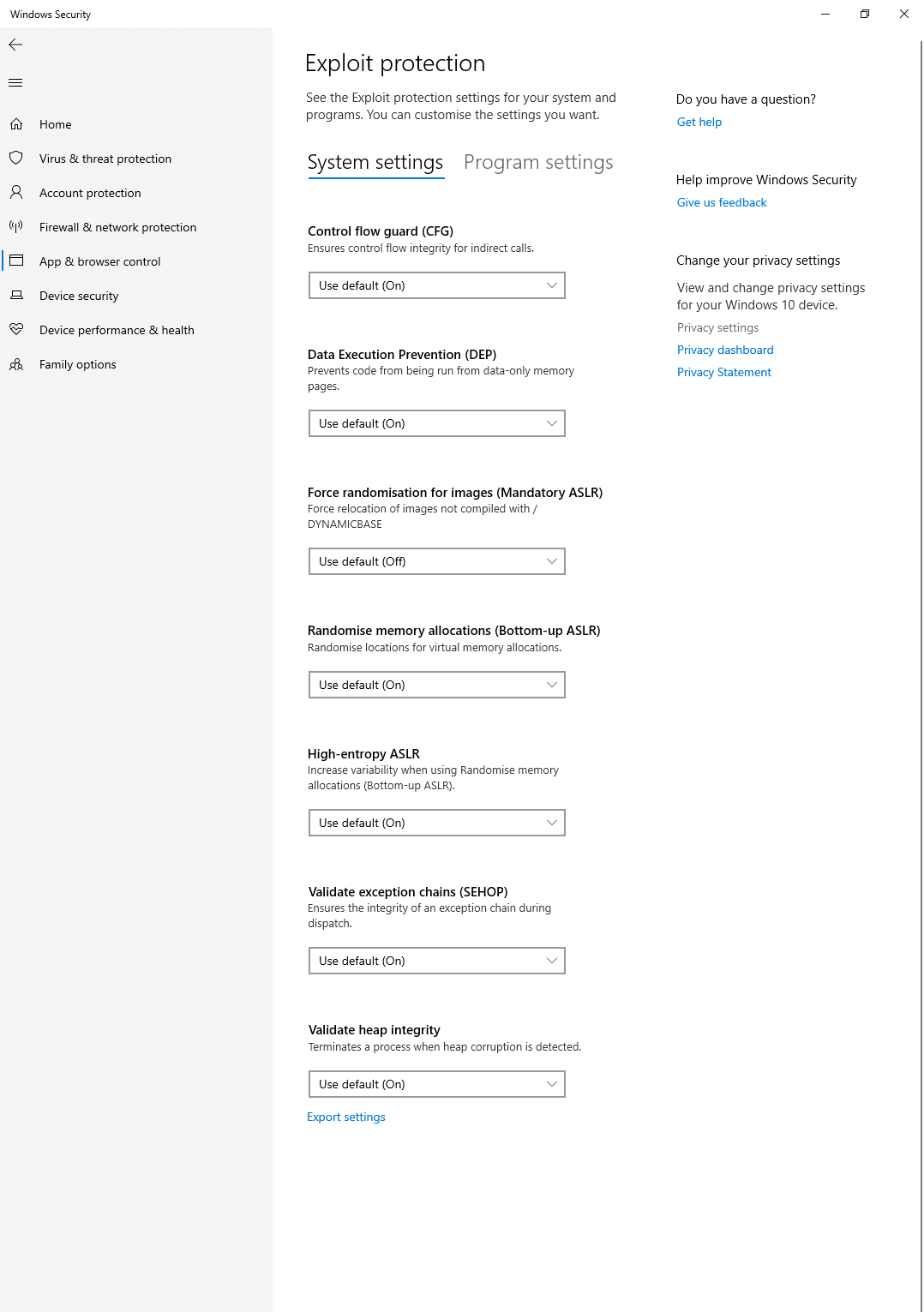
3. Make sure that **Exploit protection settings** are default, don't change them, should be same as on screenshot below
 **Solution:**
Try to restart your PC.
**Solution:**
Ensure that Game Launcher (EA/STEAM/ORIGIN/RIOT or any other) and Game are completely closed before you launch the loader.
**This is caused by missing DirectX Web Kit.**
Install the DirectX Web Kit to prevent BSOD errors.
After installing, restart your PC and try again.
**Install all Visual C++ Redistributable versions and restart your PC.**
Download and install all Visual C++ Redistributable versions at once.
After installing, restart your PC and try again.
**Possible causes:**
* Wrong keybind
* Product not injected properly
* Game overlay interference
**Solutions:**
1. Press the `Insert` key while in-game
2. Restart both the loader and game following the correct order
3. Disable any game overlays (Discord, Origin, Steam, etc.)
**Lite version not working:**
* Ensure you're using the correct loader for the Lite version
* Some features are intentionally disabled in Lite
**Full version not working:**
* Verify your subscription is active
* Re-download the loader from your account
## Quick Troubleshooting Checklist
Before contacting support, verify all of these items:
| Item | Status |
| ------------------------------- | ------ |
| Windows Defender disabled | ☐ |
| No third-party antivirus | ☐ |
| Visual C++ installed | ☐ |
| DirectX installed | ☐ |
| DirectX Web Kit installed | ☐ |
| Default browser: Edge or Chrome | ☐ |
| Game launched after loader | ☐ |
| Correct version loader used | ☐ |
Most issues are resolved by carefully following the [Preparing Your Computer](/apex-legends/preparing) and [Launching the Product](/apex-legends/launching) guides again from the beginning.
## Still Having Issues?
If you've followed all troubleshooting steps and still experience problems, open a support ticket on our Discord server with your diagnostic screenshot.
**Solution:**
Try to restart your PC.
**Solution:**
Ensure that Game Launcher (EA/STEAM/ORIGIN/RIOT or any other) and Game are completely closed before you launch the loader.
**This is caused by missing DirectX Web Kit.**
Install the DirectX Web Kit to prevent BSOD errors.
After installing, restart your PC and try again.
**Install all Visual C++ Redistributable versions and restart your PC.**
Download and install all Visual C++ Redistributable versions at once.
After installing, restart your PC and try again.
**Possible causes:**
* Wrong keybind
* Product not injected properly
* Game overlay interference
**Solutions:**
1. Press the `Insert` key while in-game
2. Restart both the loader and game following the correct order
3. Disable any game overlays (Discord, Origin, Steam, etc.)
**Lite version not working:**
* Ensure you're using the correct loader for the Lite version
* Some features are intentionally disabled in Lite
**Full version not working:**
* Verify your subscription is active
* Re-download the loader from your account
## Quick Troubleshooting Checklist
Before contacting support, verify all of these items:
| Item | Status |
| ------------------------------- | ------ |
| Windows Defender disabled | ☐ |
| No third-party antivirus | ☐ |
| Visual C++ installed | ☐ |
| DirectX installed | ☐ |
| DirectX Web Kit installed | ☐ |
| Default browser: Edge or Chrome | ☐ |
| Game launched after loader | ☐ |
| Correct version loader used | ☐ |
Most issues are resolved by carefully following the [Preparing Your Computer](/apex-legends/preparing) and [Launching the Product](/apex-legends/launching) guides again from the beginning.
## Still Having Issues?
If you've followed all troubleshooting steps and still experience problems, open a support ticket on our Discord server with your diagnostic screenshot.